Lightning Fast
Provides Bird’s Eye View
Screen Warnings & Errors
Deep Dive Warnings & Errors
Customize Ignored Warnings List
Output Text File
Contact US
INDEPTH DYNAASSISTANT
Insight-Driven LS-Dyna Simulation Support
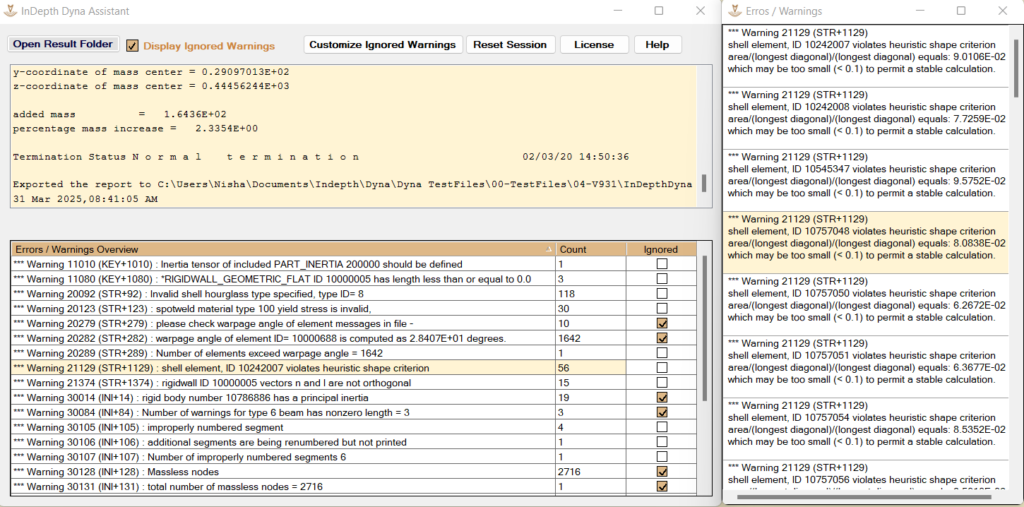
InDepth Dyna Assistant is purpose‑built to empower engineers with the critical insights they need to review, validate, and debug their LS‑Dyna simulations with exceptional efficiency. By intelligently reading LS‑Dyna d3hsp and message files within seconds, the tool delivers a clear, high‑level summary of essential simulation parameters—such as total mass, added mass, mass percentage increase, smallest timesteps etc.
Beyond quick diagnostics, it offers a comprehensive suite of capabilities that streamline deeper investigation. Engineers can view all unique warnings and errors, filter out commonly ignored messages, and drill down into specific issues directly within the intuitive GUI. The ability to copy entity IDs for further inspection in pre‑/post‑processors, customize ignored‑warning lists, and automatically generate a consolidated output text file makes the assistant a powerful companion throughout the simulation lifecycle.
With its blend of speed, clarity, and intelligent organization, InDepth Dyna Assistant becomes an indispensable tool for LS‑Dyna professionals seeking to enhance accuracy, reduce review time, and improve overall simulation quality.